Microduck Obstacle Avoidance: A Sim2Real Workflow with Isaac Lab and Newton
Add obstacle avoidance to Microduck by training a ToF‑guided navigation controller in Isaac Lab while keeping the walking policy fixed, then export and run it on the real robot.
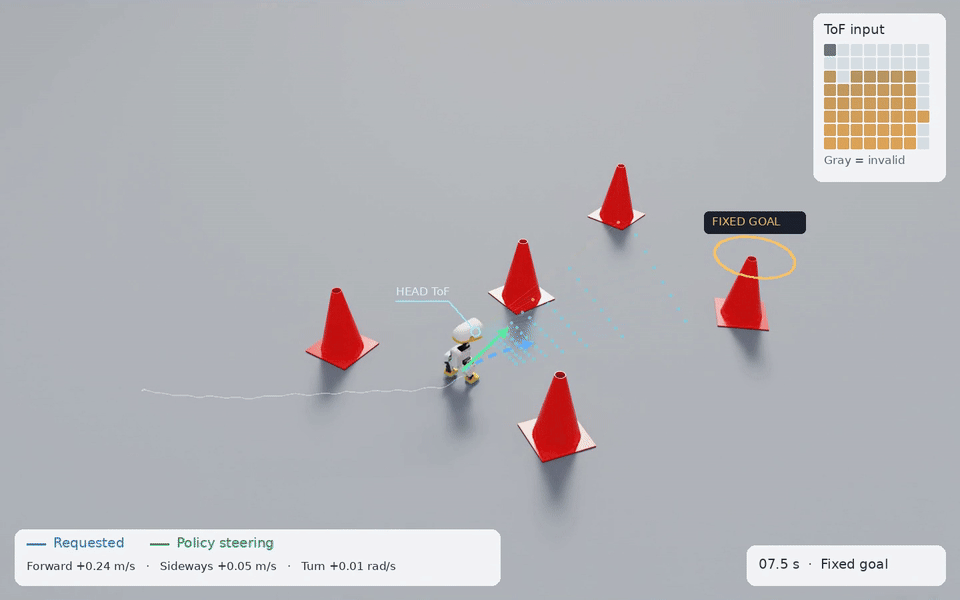
Microduck Obstacle Avoidance: A Sim2Real Workflow
TL;DR – Build a ToF‑driven navigation controller in NVIDIA Isaac Lab, train it alongside a frozen walking policy, export the model to ONNX, and deploy it on a real Microduck to steer around obstacles.
---
1. Set Up the Simulation Environment
- System requirements – Linux with a recent NVIDIA GPU, the appropriate driver, Git + Git LFS, and the `uv` package manager.
- Install Isaac Lab
```bash uv sync --frozen # after cloning the `exp/microduck` branch ```
- Verify the Microduck environments
```bash uv run isaaclab listenvs --keyword MicroDuck --showpresets ```
- Download the pretrained walking checkpoint – the obstacle‑avoidance task automatically loads this checkpoint, so you only need to fetch it once.
2. Build a Varied Obstacle Course
The tutorial uses SimReady assets (cardboard box, office bin, bedside cabinet) together with primitive shapes. After pulling the assets from Hugging Face, the environment samples a new layout at every episode reset:
- Random placement, rotation, and mirroring of props.
- Mixed clear passages, narrow gaps, and barrier clusters.
- Goal positions placed ahead of the duck.
This diversity forces the navigation policy to learn robust steering rather than memorising a single path.
3. Model the Time‑of‑Flight Sensor
A custom `MicroDuckToFCamera` class extends Newton’s ray‑caster to emulate the VL53L5CX sensor:
- Resolution: 8 × 8 grid, 15 Hz update.
- FOV: 45° horizontal/vertical, range 0.12–4 m.
- Randomisation: Pitch/height offsets, floor‑validity shifts, and a 50 % chance of missing edge measurements.
Noise and latency are injected during training so the policy remains tolerant to real‑world sensor imperfections.
4. Train the Navigation Controller
The controller receives the ToF depth map, the robot’s body state, and the operator’s game‑pad command. It outputs adjusted forward, lateral, and yaw velocities that are fed to the frozen walking policy.
Training details:
- Algorithm: PPO (proximal policy optimisation).
- Parallelism: 16 384 environments (adjustable to fit GPU memory).
- Iterations: 1 500 PPO updates (≈6 h on a DGX‑Spark with 4 096 envs).
- Rewards: progress toward the goal, clearance from obstacles, smooth command changes; penalties for collisions, fast approaches, and falls.
Command to launch training: ```bash uv run isaaclab train \ --task IsaacContrib-ObstacleAvoidance-Flat-MicroDuck \ --rllibrary rslrl \ --numenvs 16384 \ --maxiterations 1500 \ --device cuda:0 \ presets=backlash ```
5. Inspect, Export, and Visualise the Policy
After training, play back a checkpoint to verify behaviour: ```bash uv run isaaclab play \ --task IsaacContrib-ObstacleAvoidance-Flat-MicroDuck \ --rllibrary rslrl \ --checkpoint /path/to/model.pt \ --numenvs 1 \ --viz newtongl \ --video_length 1000 \ presets=backlash ``` The playback routine automatically saves TorchScript and ONNX versions of the navigation model. Keep the accompanying `.data` file alongside the ONNX file for inference.
6. Deploy on a Real Microduck
- Prepare the robot – load the same walking‑policy ONNX export used in simulation.
- Copy the navigation ONNX to the laptop that will run the inference script.
- Run a dry‑run to confirm sensor streaming and command generation without moving the robot:
```bash uv run navpad.py --robot ROBOTHOST \ --model /path/to/navigation.onnx \ --dry-run --seconds 30 ```
- Start supervised navigation – hold the game‑pad stick forward; the policy will modulate the command to avoid obstacles. Press X to toggle the controller, and Ctrl‑C to stop.
Typical safety limits:
- Max forward speed ≈ 0.15 m/s.
- Immediate braking when an obstacle is within 0.2 m.
- Stop on stale sensor data.
7. Extend the Workflow
The Microduck repository ships with many additional tasks (velocity tracking on rough terrain, stand‑up recovery, ball kicking, roller‑skating, etc.). The same Sim2Real pipeline—fixed walking policy + separate skill controller—can be reused for any of these behaviours, simply by swapping the task configuration and reward shaping.
---
Practical close – By separating balance (the walking policy) from higher‑level steering (the ToF‑guided navigation controller), you gain modularity: the walking policy can be reused across many tasks, while each new skill only requires a lightweight controller trained in Isaac Lab. Follow the steps above to get a working obstacle‑avoidance system on your Microduck, then iterate on sensor models, reward functions, or environment layouts to expand the robot’s capabilities.
Source
Read original sourceWhy we picked this
Core AI content describing a Sim2Real workflow using Isaac Lab and Newton.