Hide your slop PR descriptions behind
Use GitHub‑compatible <details><summary> tags to collapse AI‑generated PR descriptions, keeping a concise human‑written intro visible and hiding the verbose details.
Introduction
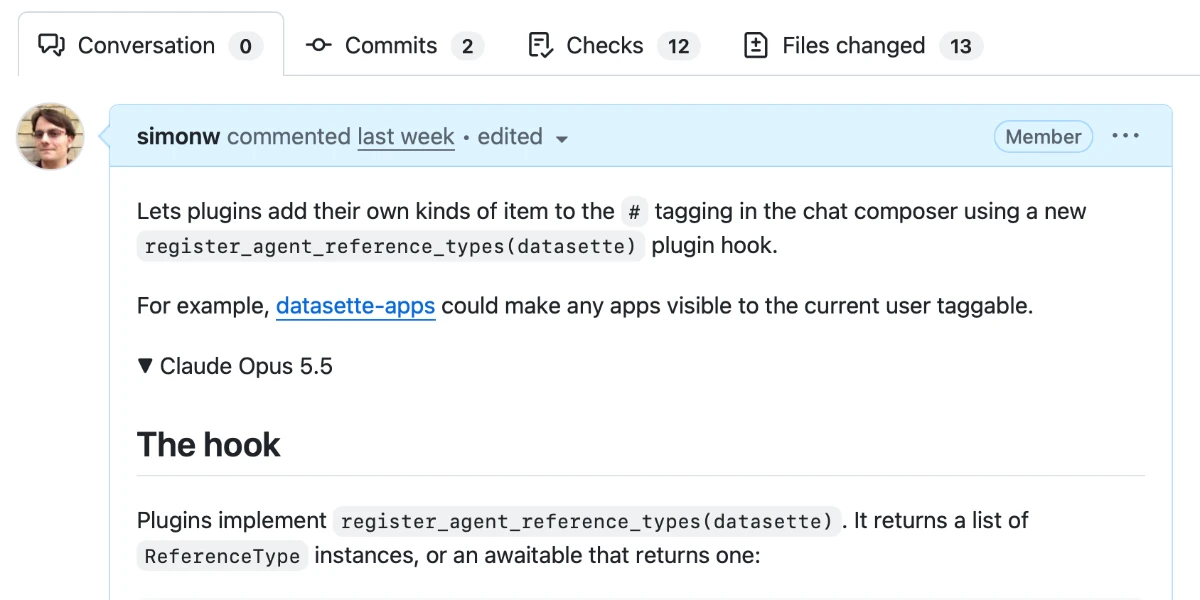
When AI assistants generate pull‑request (PR) descriptions, they often produce thorough, accurate essays that can overwhelm reviewers. The sheer volume makes it tempting to skip reading, even if the information is valuable. A simple, low‑effort technique—wrapping the full description in an HTML `<details><summary>` block—lets you keep a brief, human‑curated intro visible while hiding the rest until a reviewer chooses to expand it.
---
Why the Collapse Works
- Human‑first focus – The opening paragraph becomes a high‑level summary that a reviewer can read in seconds, deciding instantly whether the PR deserves deeper attention.
- Preserves completeness – The detailed, AI‑written explanation remains in the PR, just out of the way, so no information is lost.
- Native GitHub support – GitHub Flavored Markdown renders `<details><summary>` natively, so you can paste the tags directly into issue comments or PR bodies without extra tooling.
- Visual cue – The summary line appears with an expansion arrow, signalling that more content is available without cluttering the view.
---
Practical Implementation
- Write a concise opener – Draft a one‑ or two‑sentence summary that captures the purpose of the change. Include a screenshot if it conveys the impact faster than text.
- Add the tags – Place the summary inside a `<summary>` tag, then wrap the full AI‑generated description (and any additional context) in a `<details>` block:
```html <details> <summary>Claude Opus 5.5 – Medium effort</summary>
<!-- Full AI‑generated description goes here -->
</details> ```
- Choose a clear label – Use the model name, effort level, or a short descriptor as the summary text so reviewers know what they’re expanding.
- Optional tricks – Remember the tag order by thinking of them as a “details‑summary” pair (two syllables followed by three). Saying the phrase aloud helps cement the sequence.
---
Real‑World Examples
| PR | Human‑Curated Summary | |----|-----------------------| | `datasette #3052` | Redesign row page as a vertical list of fields – The previous table layout overflowed on wide datasets; the new layout fits on a single page. | | `datasette #3043` | Pagination bar now shows current rows – Users can see their position and navigate from both top and bottom of the table. | | `datasette #3042` | Load `edit-tools.js` on demand – The 220 KB script now loads only when an edit interaction occurs, reducing unnecessary payload. | | `datasette‑agent #51` | New `registeragentreference_types` hook – Plugins can add custom tag types to the chat composer. | | `llm #1838` | Add OpenAI endpoint management commands – CLI commands now handle adding, listing, removing, and path configuration for extra OpenAI models. |
In each case, the summary appears immediately, while the detailed rationale, code snippets, and screenshots sit inside the collapsible block.
---
Closing Thoughts
Collapsing AI‑generated PR bodies with `<details><summary>` gives reviewers the best of both worlds: a quick, human‑focused overview and full technical depth on demand. It reduces cognitive load, prevents “slop” fatigue, and keeps the repository’s discussion clean. Give it a try on your next PR and see how much smoother code reviews become.
Source
Read original sourceWhy we picked this
Discussion of AI‑generated PR descriptions, relevant AI integration use case