Chrome’s enhanced autofill can now pull info from Gmail to help you fill out forms
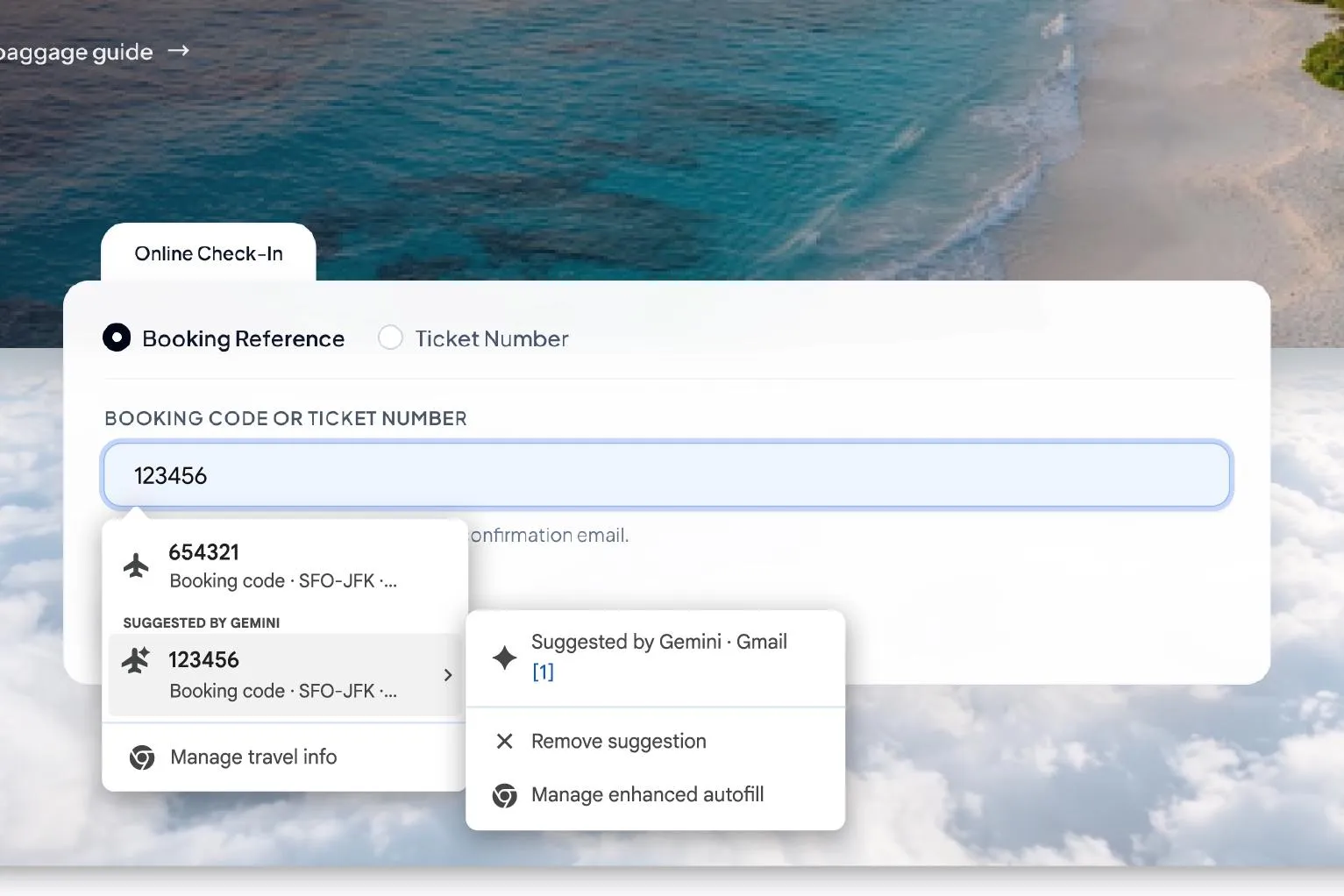
Chrome’s enhanced autofill now uses Gemini‑powered Personal Intelligence to pull relevant details from Gmail, streamlining form‑filling across devices.
Introduction
Google is expanding the capabilities of Chrome’s enhanced autofill feature. Building on last year’s rollout that pulled basic profile data from Google services, the browser now taps into Gmail via Gemini with Personal Intelligence. The goal is simple: reduce the back‑and‑forth between email inboxes and web forms by surfacing order numbers, tracking codes, travel itineraries, and other relevant details directly within the form‑filling experience.
How the Gmail‑Powered Autofill Works
When Personal Intelligence is enabled, Chrome scans the user’s Gmail for messages that contain structured information useful for common online forms. Using Gemini’s natural‑language understanding, the browser can extract:
- Order confirmations – vendor name, order ID, and purchase date.
- Shipping updates – tracking numbers and carrier details.
- Travel bookings – flight numbers, reservation codes, hotel check‑in dates.
- Event tickets – confirmation codes and venue information.
These snippets appear as encrypted suggestions in the autofill dropdown, allowing users to select the appropriate entry with a single click. The extraction happens locally on the device; only the encrypted suggestion is transmitted to the form, preserving privacy.
Managing Privacy and Control
Google emphasizes that all data pulled from Gmail remains encrypted end‑to‑end. Users retain full control through Chrome’s settings:
- Enable/disable Personal Intelligence – a toggle in the Autofill section.
- Select data sources – choose whether Gmail, Google Wallet, or other services can contribute suggestions.
- Review and delete suggestions – each suggestion can be dismissed individually, and a history log shows what information has been used.
For those who prefer a more manual approach, the feature can be turned off entirely without affecting the core autofill functionality for names, addresses, and payment details.
Availability and Platform Support
The Gmail‑enhanced autofill is rolling out in the United States today and will be available on:
- Desktop Chrome (Windows, macOS, Linux)
- Chrome for Android
- Chrome for iOS
Users must be on a recent version of Chrome and have Personal Intelligence activated in their Google account settings. The rollout will expand globally over the coming weeks as the feature stabilizes.
Practical Benefits for Everyday Users
- Speed: No more switching tabs to locate a receipt or booking confirmation; the needed data appears as you type.
- Accuracy: Reduces transcription errors from copying long strings like tracking numbers.
- Convenience: Streamlines repetitive tasks such as entering order numbers for returns or flight details for travel‑related forms.
Closing Thoughts
Chrome’s integration of Gmail data into enhanced autofill represents a modest but meaningful step toward a more context‑aware browsing experience. By leveraging Gemini’s AI capabilities while keeping the process encrypted and user‑controlled, Google aims to make everyday online interactions smoother without sacrificing privacy. As the feature matures, it could become a standard expectation for browsers—turning email inboxes into silent assistants that surface the right information at the right moment.
Source
Read original sourceWhy we picked this
Core AI integration using Gemini for autofill features