Chrome’s AI-powered Autofill can now dig through your Gmail to fill out forms
Chrome’s new AI‑powered Autofill can pull relevant details from Gmail to automatically fill online forms, boosting convenience while keeping data encrypted.
Introduction
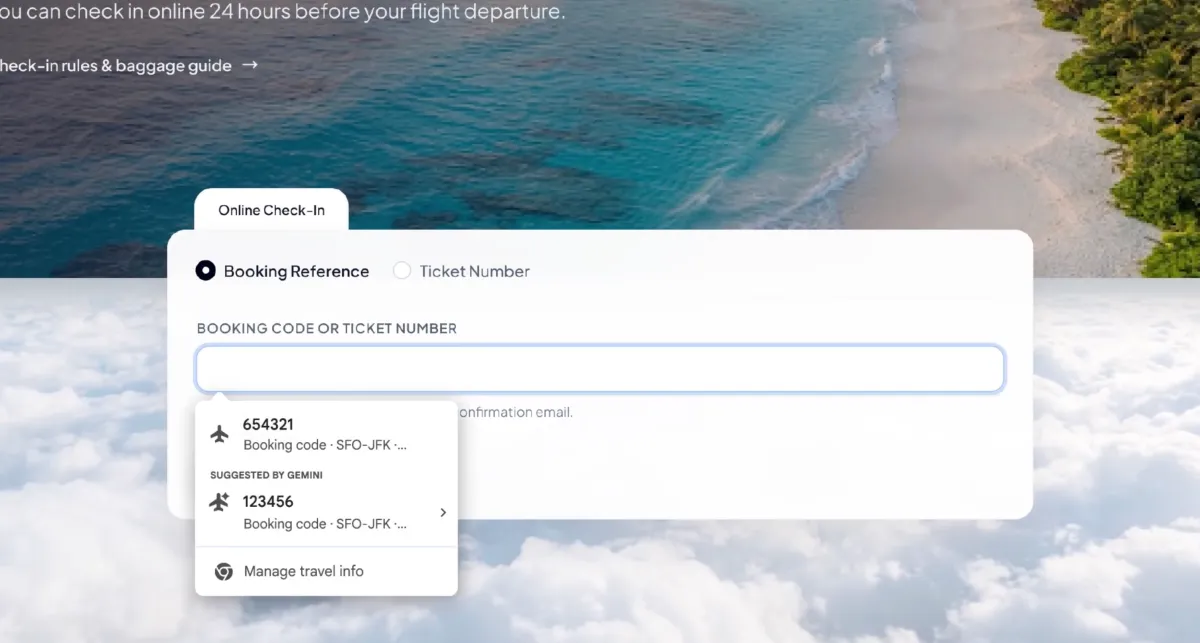
Google is rolling out an AI‑enhanced version of Chrome’s Autofill that can scan a user’s Gmail for relevant information—flight numbers, order IDs, addresses, phone numbers, and even credit‑card details—and suggest them when filling out web forms. The feature, part of Google’s broader Personal Intelligence suite built around the Gemini AI model, aims to make browsing smoother and keep users within Google’s ecosystem.
How the AI‑driven Autofill works
When a user enables the feature in Chrome’s settings, the browser can securely access the contents of their Gmail inbox. Using Gemini’s natural‑language understanding, Chrome identifies data that matches the context of a form field. For example, if a checkout page asks for a tracking number, Chrome may surface the most recent shipping confirmation email and suggest the appropriate code. The same logic applies to flight confirmations, membership IDs, or any other structured data that appears in email messages.
Key points of the implementation:
- User‑controlled activation – The feature is optional and can be toggled on or off in the browser’s settings.
- End‑to‑end encryption – All email data used for autofill remains encrypted on Google’s servers, and only the necessary snippets are processed.
- Cross‑platform rollout – Initially available to U.S. desktop users, with extensions planned for iOS and Android Chrome apps that already support Gemini.
Benefits and potential concerns
Convenience
The AI‑driven Autofill reduces the friction of repeatedly copying and pasting information from emails into forms. It mirrors Apple’s popular one‑tap verification‑code feature, but expands the scope to a broader set of data types. Users can complete purchases, sign‑up forms, and travel bookings faster, which may increase satisfaction and loyalty to Chrome.
Privacy and security
Because the feature accesses personal email content, privacy is a primary concern. Google emphasizes that data is encrypted both in transit and at rest, and that only the minimal information needed for a specific form field is extracted. Nonetheless, users should review the permission prompts and consider the trade‑off between convenience and exposure of email data to an AI service.
Ecosystem lock‑in
By tying form‑filling convenience to Gmail, Google subtly encourages users to keep their email and browsing activities within its ecosystem. Competitors may need to develop comparable AI integrations to stay competitive, potentially leading to a broader industry shift toward AI‑augmented browsers.
Getting started
- Open Chrome Settings → Autofill → Enable AI‑powered Autofill.
- Grant Gmail access when prompted; ensure two‑factor authentication is active for added security.
- Test the feature on a form that requests information you’ve received via email (e.g., a shipping‑tracking field).
- Review and edit any suggested entries before submitting to confirm accuracy.
Conclusion
Chrome’s AI‑enhanced Autofill represents a practical step toward a more seamless web experience, leveraging Gmail’s rich data to auto‑populate forms with minimal user effort. While the convenience is clear, users should stay mindful of privacy settings and the broader implications of deeper AI integration in everyday browsing.
Source
Read original sourceWhy we picked this
Introduces Chrome's AI-powered Autofill feature, a notable AI integration.