Apple is adding an AI chatbot to Pages, Keynote, and Numbers
Apple is rolling out an AI chatbot for Pages, Keynote, and Numbers that can draft text, design slides, and organize data, initially as a beta for devices running iOS 27, iPadOS 27, or macOS 27.
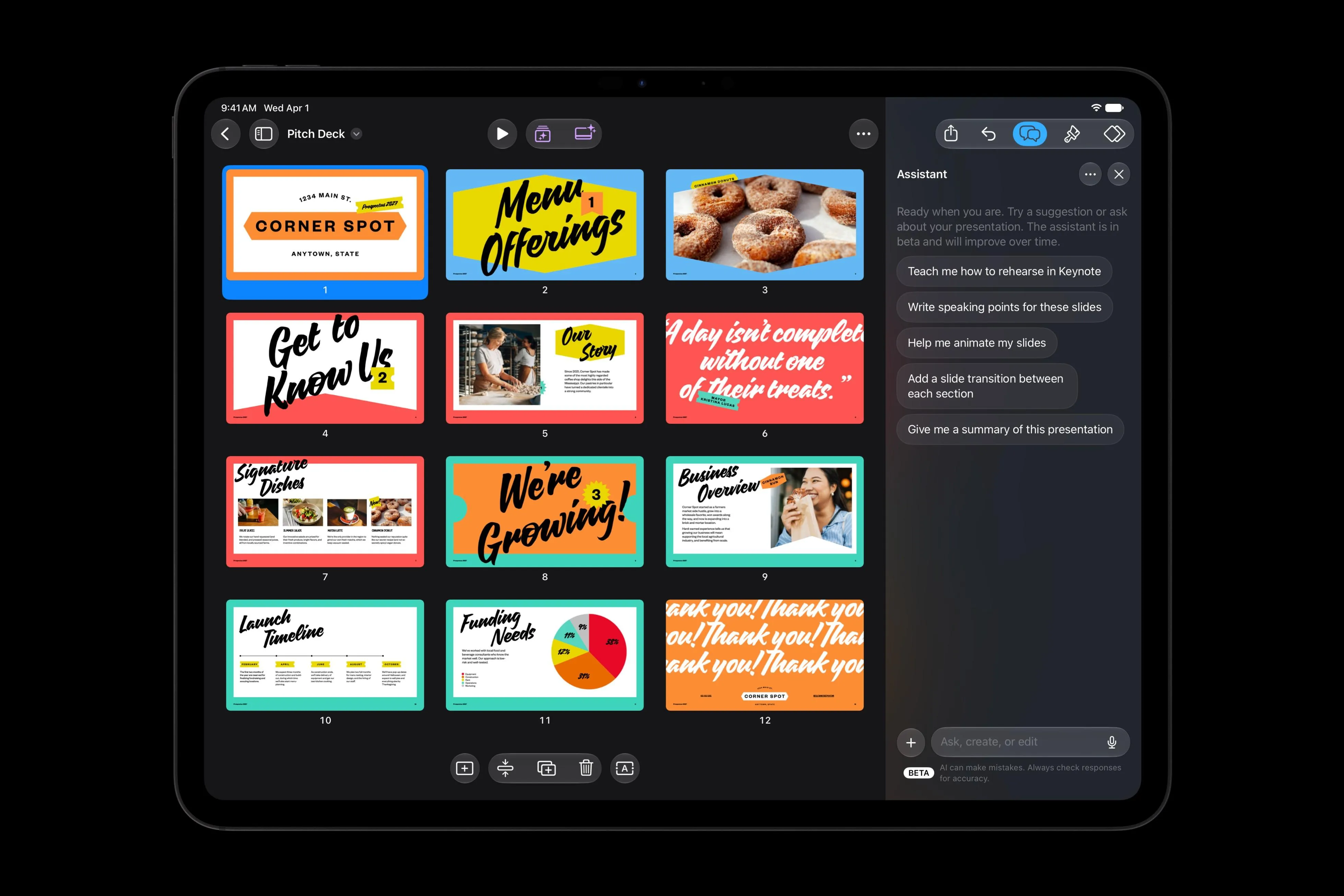
Apple Introduces an AI Assistant to Its Core Productivity Suite
Apple is expanding its on‑device intelligence strategy by embedding a conversational AI assistant directly into Pages, Keynote, and Numbers. The feature, currently in beta, leverages a blend of Apple‑built models and OpenAI technology to understand the context of a document and perform a range of creative and analytical tasks. It arrives alongside broader updates to Apple’s creator tools, signaling a push to make AI‑driven workflows a standard part of the Mac and iPad experience.
---
What the Assistant Can Do in Each App
- Pages – Users can ask the assistant to draft new sections, rewrite existing paragraphs, or restructure an entire document. The AI respects the surrounding style and can suggest headings, bullet points, or tone adjustments without leaving the editing window.
- Keynote – The assistant analyzes slide content and offers design recommendations, such as layout tweaks, animation suggestions, and visual hierarchy improvements. It can also generate new slides from a brief description, automatically selecting appropriate templates and imagery.
- Numbers – In spreadsheets, the AI helps with data entry, formula creation, and chart selection. By describing the insight they need, users can receive calculated results, visualizations, and even custom tables that fit the data set.
These capabilities are powered by Apple’s Model Context Protocol, which allows third‑party AI agents to plug into the apps. While the built‑in assistant is the default experience, developers will soon be able to integrate their own models, expanding the ecosystem of AI‑enhanced productivity tools.
---
How It Works and Who Can Try It
The assistant is available as a beta on devices that support Apple Intelligence – specifically those running iOS 27, iPadOS 27, or macOS 27 and later. Activation is handled through the system settings, where users can enable the “AI Assistant” toggle for each app. Once enabled, a small chat‑style pane appears at the bottom of the document, ready to receive natural‑language prompts.
Apple emphasizes on‑device processing for privacy‑sensitive tasks, while more compute‑intensive operations may be offloaded to secure Apple servers. The hybrid approach aims to balance performance with the company’s longstanding focus on user data protection.
---
The Bigger Picture: AI Across Apple’s Creative Tools
The Pages‑Keynote‑Numbers assistant is part of a larger rollout of AI features across Apple’s creative suite:
- Pixelmator Pro introduces a “Generate Fill” tool that edits image regions based on textual descriptions, automatically matching lighting and perspective.
- Logic Pro adds an AI helper that can set up vocal tracks from a single prompt and assist with project editing.
- Final Cut Pro receives AI‑curated templates, graphics, and a built‑in Content Hub for stock media, all accessible without leaving the editing timeline.
These updates reinforce Apple’s strategy of embedding AI where it can streamline creative workflows, rather than positioning it as a separate product. By keeping the assistant tightly integrated with native apps, Apple hopes to deliver a seamless experience that feels like an extension of the existing toolset.
---
Practical Tips for Early Adopters
- Start Simple – Begin with straightforward prompts (e.g., “Create a three‑slide overview of our Q2 results”) to gauge the assistant’s interpretation.
- Iterate – Use follow‑up prompts to refine output. The assistant retains context within a session, allowing you to ask for style changes or additional data without re‑entering the whole request.
- Review Carefully – While the AI can generate accurate content, it may occasionally misinterpret nuanced instructions. Treat its suggestions as drafts to be edited, not final copy.
- Explore Third‑Party Agents – Keep an eye on the App Store for additional AI agents that can plug into the Model Context Protocol, offering specialized capabilities for niche workflows.
---
Looking Ahead
Apple’s AI assistant for its flagship productivity apps marks a significant step toward a more intelligent, context‑aware computing environment. By combining on‑device privacy with the flexibility of third‑party extensions, Apple is positioning its ecosystem as a fertile ground for AI‑enhanced creativity. As the beta expands and more developers join the protocol, users can expect a growing toolbox that turns natural language into polished documents, compelling presentations, and insightful spreadsheets—all without leaving the familiar Apple interface.
Source
Read original sourceWhy we picked this
Core AI content: Apple adds AI chatbot to its productivity suite, showcasing new model integration.