Android’s DIY widgets are a bit of vibe-coding fun
Android’s new AI‑driven “Create My Widget” lets you craft quirky, glance‑able home‑screen widgets, but its practical utility remains limited.
Android’s DIY Widgets: A Playful Glimpse at AI‑Powered Home Screens
Google’s recent rollout of Create My Widget, an AI‑assisted tool for building custom Android widgets, feels more like a sandbox for creativity than a productivity breakthrough. While the feature lets anyone on a Pixel device spin up personalized tiles in seconds, its real‑world usefulness—especially for tasks that demand live data—still falls short.
What “Create My Widget” Actually Does
At its core, the feature is a thin layer on top of Gemini, Google’s conversational AI. Users start with a template or a plain‑language description, and Gemini generates a widget that either displays static content (quotes, weather‑based messages) or acts as a shortcut that launches a Gemini query on tap. The process is deliberately fast: a typical widget materializes in under 30 seconds, and the interface offers suggestions ranging from habit trackers to recipe ideas.
Fun Experiments That Showcase the Spirit of the Tool
The author of the original Verge piece tried a few whimsical concepts:
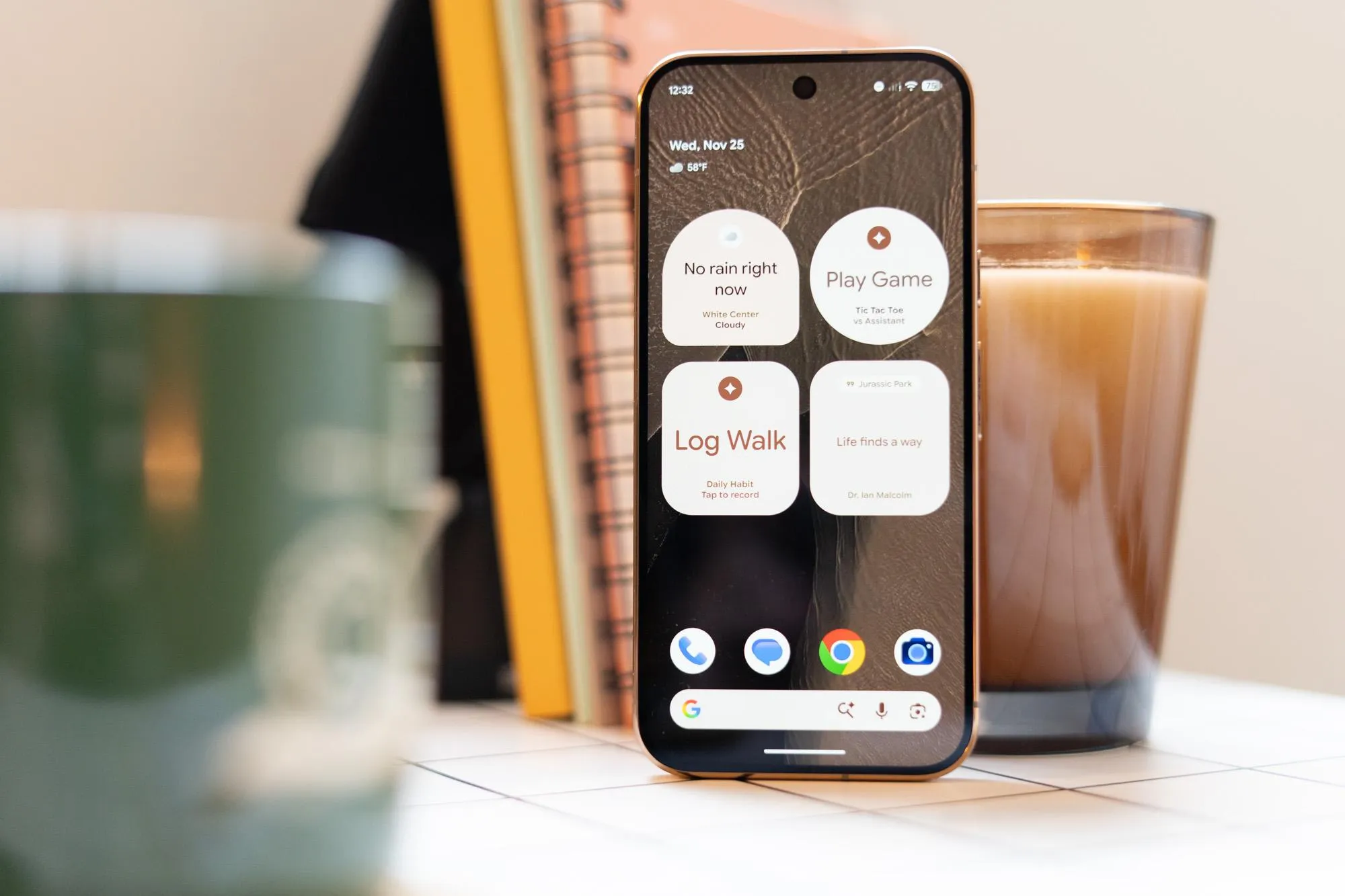
- Jurassic Park Quote Widget – pulls a different line from the original film each hour, linking to a Reddit thread for fans to discuss.
- Rain‑Alert Widget – displays a cheeky “Tut tut, looks like rain” message when precipitation is detected in Seattle, otherwise shows a bland “No rain right now.”
- Walk‑Log Widget – a simple tap‑to‑add‑a‑walk entry in the calendar, with an optional checklist for weekly streak tracking.
These examples highlight the tool’s strength: rapid, low‑effort personalization that can inject humor or a dash of personality into an otherwise utilitarian home screen.
Where the Tool Stumbles: Real‑Time Data and Complex Tasks
The most telling limitation appears when the author attempted a bus‑arrival widget. The request—display live arrival times for a specific stop—resulted in a generic “Bus Arrivals” tile that merely queried Gemini for schedule information. Instead of a live feed, the widget returned a static, wordy description of the route’s frequency, which is hardly helpful for catching a bus on time.
Similarly, more sophisticated use‑cases (stock tickers, fitness metrics, dynamic news feeds) would require continuous data streams that the current AI‑generated widgets don’t support. For now, they act more like quick shortcuts to launch a Gemini conversation rather than fully fledged mini‑apps.
The Bigger Picture: Vibe‑Coding vs. Practical Automation
Google frames the feature as part of its “Gemini Intelligence” suite, blurring the line between app development and on‑device AI assistance. This “vibe‑coding” approach invites users to experiment without needing to write code, fostering a playful culture of home‑screen customization.
However, the trade‑off is evident: the one‑size‑fits‑all templates prioritize ease of creation over depth of functionality. Users looking for reliable, data‑driven widgets may still need dedicated apps or traditional widget development.
Bottom Line: A Fun Toy With Room to Grow
Create My Widget is an enjoyable glimpse into a future where anyone can conjure a personalized widget with a sentence or two. It excels at delivering light‑hearted, glance‑able content that reflects the creator’s personality. Yet, for those who rely on real‑time information or complex interactions, the tool remains a novelty rather than a replacement for purpose‑built widgets.
As the feature matures—potentially integrating live APIs or offering deeper customization—it could evolve from a playful experiment into a genuine productivity enhancer. Until then, expect to see more quirky quotes and weather‑based jokes on Pixel home screens, and keep an eye on dedicated apps for the heavy lifting.
Source
Read original sourceWhy we picked this
Meaningful AI news: discusses an AI-powered Android widget use case.